Consolidated Email Settings
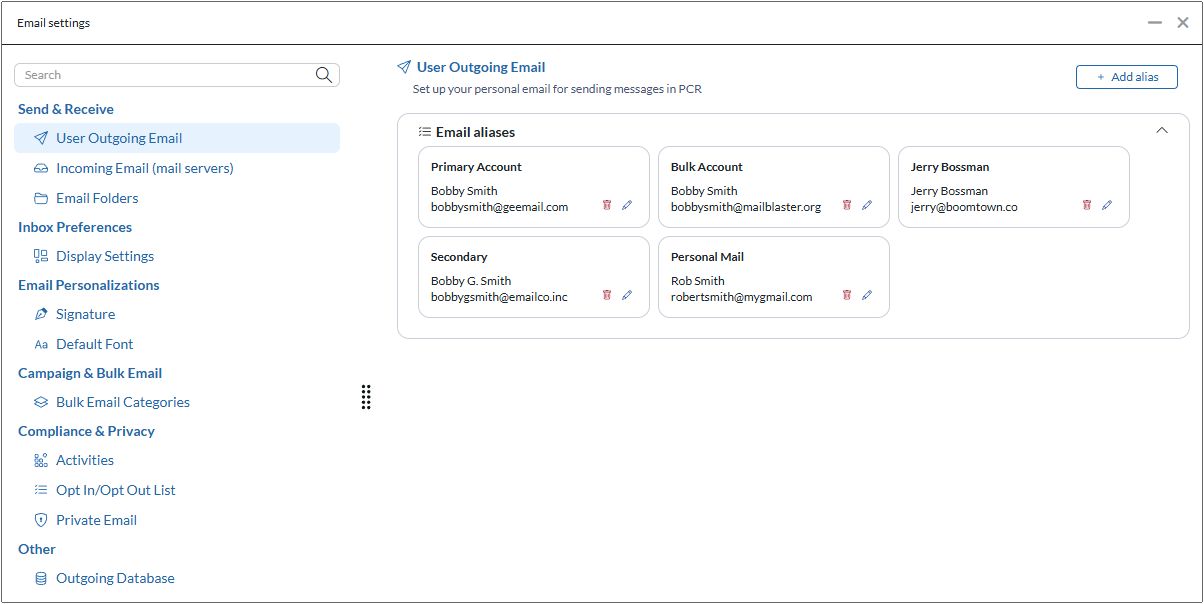
The most noticeable new feature is a new Email Settings panel under SYSTEM. This panel, borrowed from our PCRM interface, consolidates all of the key email settings panels into a single view for easy configuration and quicker setup of new users.
You can find this area by navigating to SYSTEM >> Email Setup >> Email Settings. While the familiar email settings screens in PCR 9 still remain available, they will likely be phased out in a future version in favor of this convenient new utility. Here are the settings you can reach within it:
- User Outgoing Email: Add/edit your outgoing email accounts and aliases.
- Incoming Email: Add/edit your incoming email accounts for sync with automatic activity logging.
- Email Folders: Map your incoming email’s Sent, Trash, and other folders to PCR.
- Display Settings: For PCR’s internal email client, set messages per page and other preferences.
- Signature: Manage the HTML email signature used for emails and form letters.
- Default Font: Choose the ‘base font’ for your emails to use when none is specified in the content.
- Bulk Email Categories*: Select your active categories for reporting on mass-email sends.
- Activities: Enable IMAP email logging and choose emails to exclude from activity logs.
- Opt In/Opt Out List*: View and manage the email opt-in and opt-out list.
- Private Email*: Define specific email addresses to be excluded from any Activity records for emails sent to or from, or containing that email address in the body.
- Outgoing Database*: Configure the main email account that PCR will use for sending automated notifications and other non-user-specific communications.
* These items are only visible to administrator level accounts.
PCRM Improvements
We have also made some quality-of-life improvements within the PCRM interface, our streamlined, simplified, CRM-focused view of your PCR data (talk with your representative for a demo or overview).
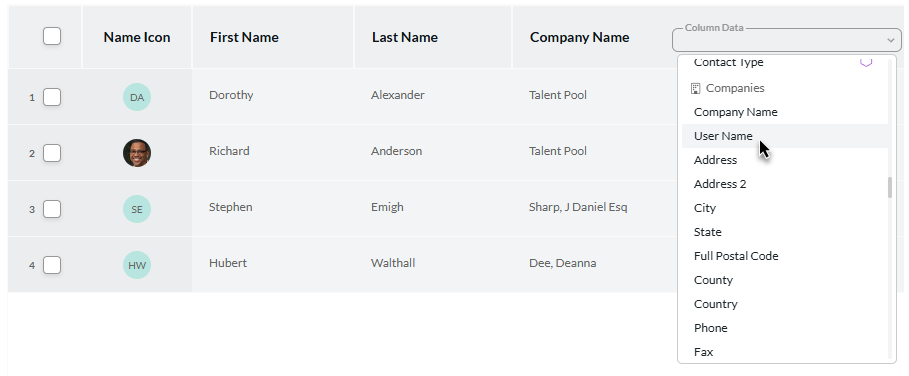
Cross-Table Field Display: When configuring your Name and Position record listing grid, you can now select columns from the Company record to show along side them.
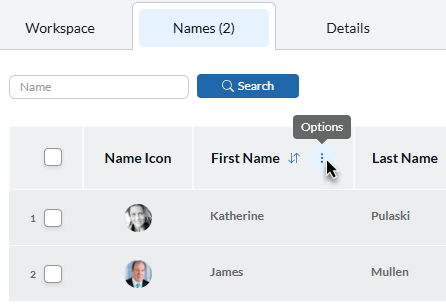
Sort and Edit Columns in Company Name List: When viewing the Names tab within a Company, you’ll now be able to configure which columns appear and you’ll be able to re-sort by the column, similarly to the sorting and customization in the main Name search/list grid.
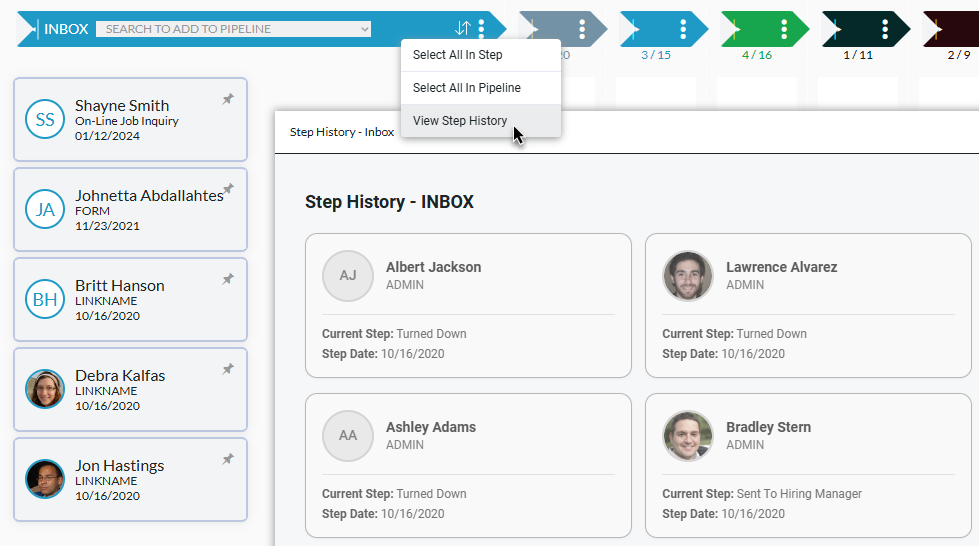
View Step History: Accessed from the ⋮ icon in the bar on any Pipeline Step, the Step History panel has been carried over from PCR 9 into to PCRM. This popup displays the candidates who were previously placed in that step.
WordPress Plugin Updates
In December we released the 2.0 version of our PCRecruiter Extensions job board plugin for WordPress. Following that release, there have been a flurry of additional capabilities added to it, bringing better search relevance, stronger SEO, smarter caching, and better compatibility with other plugins. The changes made since the initial release include:
SEO & Discoverability
- Yoast SEO integration – Automatic generation of SEO titles, descriptions, and meta tags for job posts
- All in One SEO (AIOSEO) support – Full compatibility with AIOSEO for meta field population and optimization
- Enhanced meta descriptions – Better extraction and tagging of job descriptions for search engines
- Open Graph image fallback – Ensures social media shares always have an image, even when job-specific images aren’t available
Location-Based Job Search
- Radius search with distance sorting – Search jobs by location and automatically sort results by distance
- Zipcode field handler – Improved location search accuracy with zipcode support
- Default radius search styling – Better out-of-the-box appearance for location-based searches
Advanced URL & Permalink Options
- Custom job URL configuration – Choose which fields (city, state, country, position ID) to include in job URLs for uniqueness when titles are the same, and for better SEO / readability
- Salary formatting by currency type – Auto display of salary format based on currency
Performance & Compatibility
- Performance optimizations – Multiple rounds of speed improvements
- Cache plugin compatibility – Automatic cache clearing in WP Rocket, W3 Total Cache, WP Super Cache, LiteSpeed Cache, WP Fastest Cache, and Autoptimize when jobs are updated
- Optimization plugin protection – Prevents defer/lazy-load plugins from interfering with PCRecruiter iframes and JavaScript
Display & User Experience
- Social share widget improvements – Better responsive width adjustments
- Date display format options – Customizable formatting for Date Posted and Last Modified fields
- Multi-check search fields – Fixed handling of checkbox-based search filters
- Keyword search relevance sorting – Search results automatically rank by relevance to search terms
We can help you upgrade your WordPress-based website to use the newer API-based configuration. All you need is admin access to your site and we can handle the rest! Contact us for a quote or consultation.